Leaders rarely stop watching because the findings are weak. They stop because the reel drags, and nothing drags like footage of someone working through a task.
Why do leaders stop watching research reels?
Most of us have sent a reel we were proud of, then watched the view data (or the meeting) tell a different story. Someone opens the link, watches the first clip, scrubs ahead, and closes the tab. Later they ask you to summarize it in a sentence.
Three things usually cause this.
Length. We collect a lot of good material, and it feels wrong to leave it out. But a reel is not an archive. Every extra clip asks a busy person for their attention, and the strongest moment ends up buried.
Dead air. Interview and task footage is full of pauses: a participant thinking, a page loading, a moderator saying they will wait. Some pauses carry meaning, but for a viewer they can read as nothing happening.
Repetition. Task-based benchmarking sessions are especially prone to this. A participant clicks into a menu, backs out, tries again, and tries a third time. Friction is important to communicate, but repetition can be dull.
The good news is that all three are editing problems, not research problems. The evidence is already there. You just need to shape it.
What is each clip actually for?
Before you touch speed or trimming, decide why each clip is in the reel. In my experience almost every useful clip does one of three jobs.
Proof. The clip shows that the thing you are claiming really happens. A participant fails to find the export button. Someone misreads the pricing page. Proof clips are about behavior, and the viewer needs to see it to believe it.
Context. The clip explains the situation around a finding: who this person is, what they were trying to do, why the moment matters.
Emotion. The clip shows how the problem feels. Frustration, relief, a laugh, a long sigh. Emotion is what leaders remember and repeat in the next planning meeting.
If a clip does not clearly do one of these jobs, cut it. If two clips do the same job for the same finding, keep the stronger one.
How fast should each clip play?
Once each clip has a job, pacing gets much easier. Not every clip should play at the same speed, because not every clip is asking the viewer to do the same thing.
Quotes often stay at 1x-1.5x. When a participant is speaking, the words and the delivery are the point. Speeding up a quote too much can make a point harder to follow.
Task footage can go faster. When the clip is proof of behavior, the viewer usually needs to see the path, not linger on every second of it. Playing a long navigation sequence at 1.5x or 2x keeps the evidence intact while respecting the viewer's time. The struggle is still visible, it's just less punishing to watch.
Occasionally, slow things down. If the key moment is a quick misclick or a tooltip that flashes and vanishes, playing that clip at half speed can make sure nobody misses it.
How do you cut silence and repeated actions?
Pace footage that is slow but meaningful. Trim footage that is not meaningful at all.
Start late, end early. Most clips begin a few seconds before anything happens and end a few seconds after. Tighten the start to the first meaningful word or action and the end to the moment the point is made.
Show a repeated action once. If a participant tries the same thing three times, one attempt usually proves the point. If the repetition itself is the finding (they kept trying because nothing told them it failed), keep it but speed it up.
Split long tasks. A five-minute task recording often contains one or two moments that matter. Pull those out as separate clips instead of trimming around the edges of one long clip.
Leave some meaningful pauses. Not all silence is dead air. A long pause before a participant says they would never use the feature may tell the viewer something.
Where does Clipses fit?
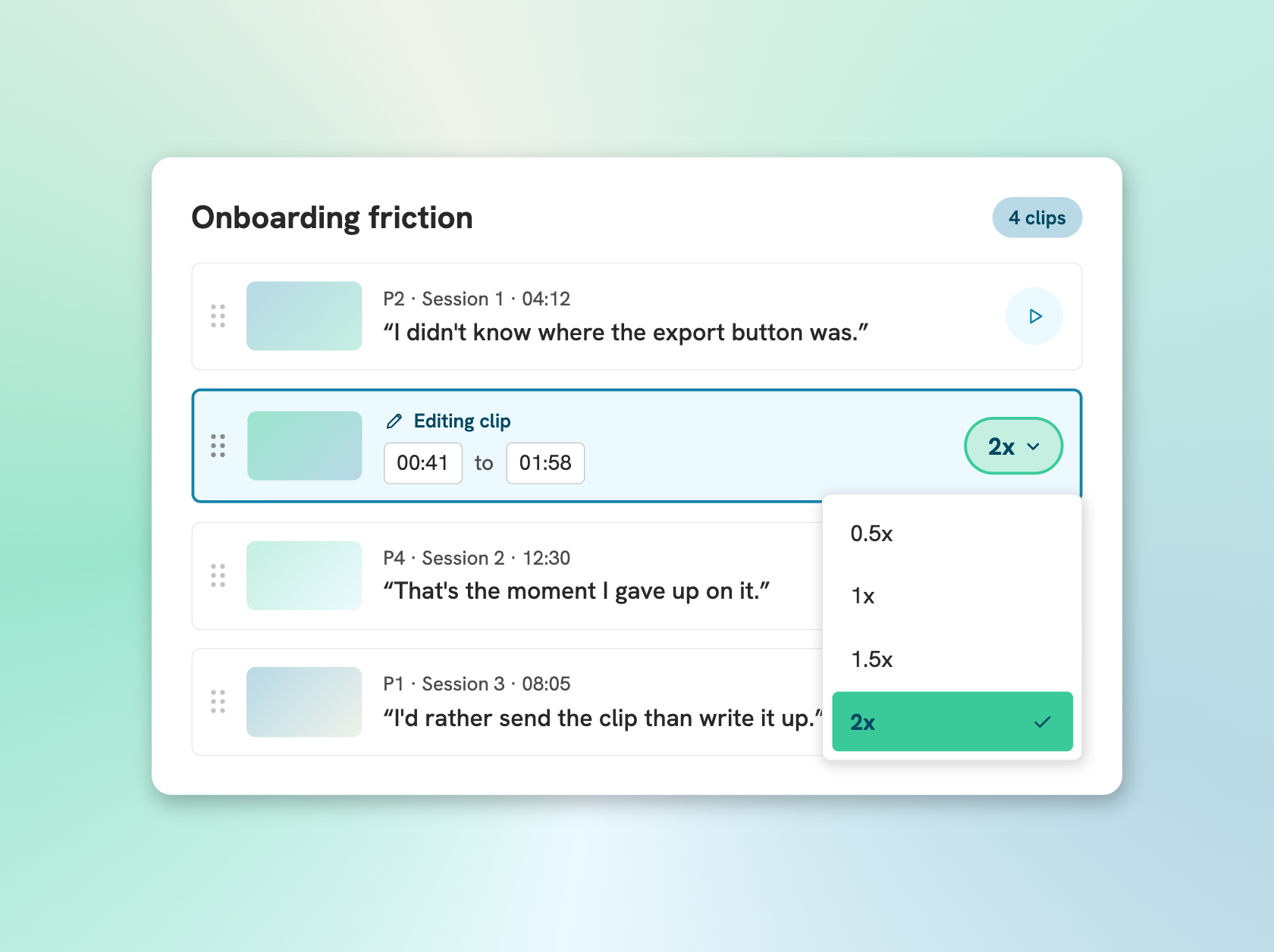
This is the part of the workflow Clipses is built for. Clipses turns research interview footage into searchable transcripts and shareable highlight reels, and it now lets you set the speed of each clip individually, so you can pace a reel without opening a video editor.
Click the edit (pen) icon on a clip and the play icon changes to show 1x. Click it to open the speed menu and choose 0.5x, 1x (the default), 1.5x or 2x. If you click outside the menu, nothing changes, so you can open it and back out safely.
A few details worth knowing:
- Pitch is not corrected. A clip at 1.5x or 2x will sound higher, and a clip at 0.5x will sound lower.
- Captions stay in sync at every speed.
- The speed carries to the reel. Set a clip to 2x and it plays at 2x in the share link your stakeholders get.
- Works in Claude and ChatGPT connectors. If you work with an AI assistant, you can also change clip speed through the Clipses connector (MCP). Ask for a specific clip's speed to be changed, and that individual clip gets the new speed within the reel.
- You can edit existing reels. If your reel is already finished, it will be locked. Reels sit on the right of a video. Choose Unlock and edit, make your changes, then Update reel. The existing share link shows the new speed, so you do not need to resend anything.
What should you check in the five minutes before you share?
Before you send the link, watch the reel once from start to finish, the way a leader would. Then run through this list.
1. Can you name the job of every clip? Proof, context or emotion. If you hesitate, cut it.
2. Does the first clip earn the second? Your strongest finding should come early, not after the warm up.
3. Is the task footage paced? If you caught yourself wanting to skip ahead, speed it up or trim it.
4. Does every clip start and end tight? Look for the few seconds of nothing at either end.
5. Is any action shown more than once without a reason?
6. Do the captions read cleanly with the sound off? Many leaders will watch that way.
7. Would you watch it to the end if it were not yours? Be honest. If not, cut one more clip.
Give every clip a job, pace it for that job, cut what is not doing anything, and your findings will get the attention they already deserve.